


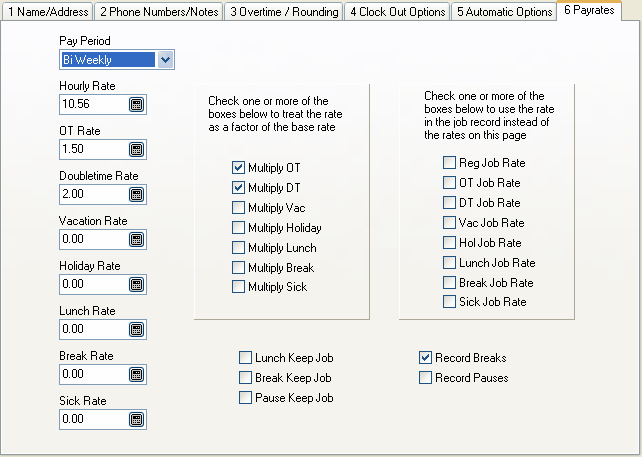
Pay Period
For information purposes only. Power Clock reports are generated based on the dates you enter when you run the report.
Rate Factors
All pay rate fields except Hourly Rate can be treated as a factor of the base rate. In the example above we have an Hourly Rate of 25.25. The OT Rate is 1.50. Since Multiply OT is also checked, the overtime rate will be calculated as the OT Rate x Hourly Rate. Hence the OT rate will be 1.50 x 25.25 = 37.88. In the example above, the doubletime rate is calculated as 2 x 25.25 = 50.50 since Multiply DT is checked.
Job Rates
The set of check boxes on the right side determine if the pay rate from the job record will be used instead of the rates listed here. If Reg Job Rate is checked and the employee clocks in using a job code that has a pay rate set then that job pay rate replaces the Hourly Rate. If the job has a zero pay rate then the employee's base hourly rate is used.
Lunch keep job, Break keep job, Pause keep job
These options determine what happens to the employees job when the employees uses Pause Time. If the box is not checked then the job code they had selected when they clocked in is cleared when they go on lunch or break and they will have to enter a job code when they return from lunch/break.
Record Breaks
Check this box to keep a record of breaks when the employee uses Pause Time and selects Break as the type.
Record Pauses
Check this box to keep a record of pauses when the employee uses Pause Time and select Pause as the type.