


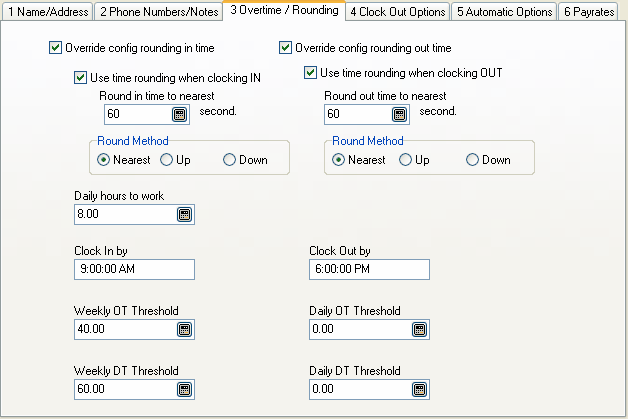
Override config rounding in time
Check this box to override the clock in rounding setting in the location file.
Use time rounding when clocking in
If this box is checked, the time rounding options entered below will be activated.
Round in time to nearest xxx second
Enter a numeric value here to make Power Clock round clock in times. Enter the number of seconds that hours are broken into. For example, to round times to the nearest minute, enter 60 here. To round times to the nearest quarter hour enter 900.
Round Method
Nearest rounds to the nearest second increment.
For example, assuming a 60 second increment, clocking in at 9:09:20, the time will be rounded to 9:09:00 since 9:09:20 is closer to 9:09:00 than to 9:10:00.
Up always rounds up to the next second increment.
For example, assuming a 60 second increment, clocking in at 9:09:20, the time will be rounded up to the next minute 9:10:00.
Down always rounds down to the next second increment.
For example, assuming a 60 second increment, clocking in at 9:09:45, the time will be rounded down to the previous minute, 9:09:00.
|
|
These are the same settings as shown above except they only apply when an employee is clocking out.
Daily hours to work
Enter the number of hours required per day for this employee. This number is used in the Time Summary by Month report.
Clock In By
Enter the time this employee must clock in by. This value is used in the Off Schedule report.
Clock Out By
Enter the time this employee must clock out by. This value is used in the Off Schedule report.
Weekly OT Threshold
Enter the number of hours per week an employee has to work before they begin accumulating overtime. Overtime hours and pay shown on time reports are based on this number.
Daily OT Threshold
Enter the number of hours per day an employee has to work before they begin accumulating overtime. Overtime hours and pay shown on time reports are based on this number.
Weekly DT Threshold
Enter the number of hours per week an employee has to work before they begin accumulating doubletime. Doubletime hours and pay shown on time reports are based on this number.
Daily DT Threshold
Enter the number of hours per day an employee has to work before they begin accumulating doubletime. Doubletime hours and pay shown on time reports are based on this number.