


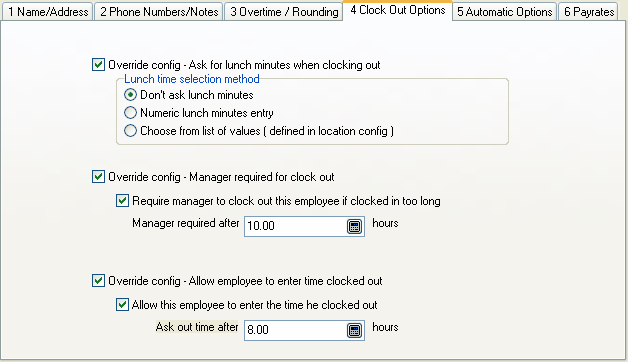
Override config - Ask for lunch minutes when clocking out
Check this box to override the setting in the location record.
Lunch time selection method
Select one of the options:
Don't ask lunch minutes
Numeric lunch minutes entry
Choose from list of values ( defined in location configuration )
Override config - Manager required for clock out
Check this box to override the setting in the location record. Useful if this is a problem employee who often forgets to clock out or tries to cheat on time.
Require manager to clock out this employee if clocked in too long
Check this box to require a manager to clock out employees who stay clocked in longer then the number of hours specified in the next field.
This option can also be activated for all employees in the current location configuration.
Manager required after xxx hours
This is the number of hours after which a manager must be logged in before the employee can clock out. When an employee tries to clock out and they have exceeded the number of hours entered here, a manager must be logged in to clock them out. The manager must have "Manager Clock out" enabled in their security profile.
Override config - Allow employee to enter time clocked out
Check this box to override the setting in the current location configuration.
Allow this employee to enter the time he clocked out
Check this box to allow employees to enter the time they clocked out when they stay clocked in longer than the hours specified in the next field. This is useful if you have employees who forget to clock out and you trust them to enter the correct clock out time.
This option can also be activated for all employees in the current location configuration.
Ask out time after xxx hours
Enter the number of hours after which this employee is asked what time they clocked out.