


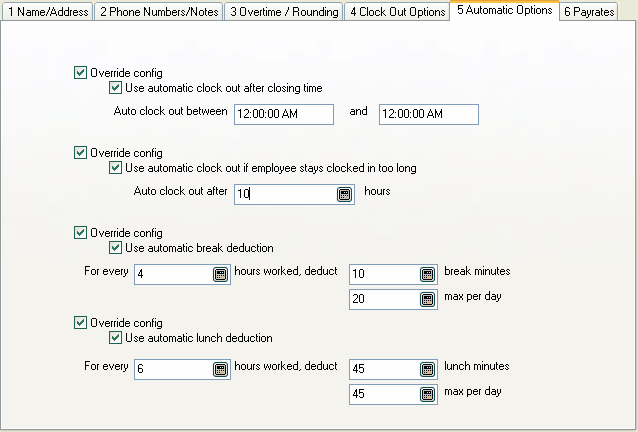
These are the same options as in the location configuration. Here you can override them for each employee if needed. See location configuration to enable or disable these options for all employees.
Use automatic clock out after closing time
Check this box to automatically clock employees out between the times entered in the next two fields.
Auto clock out between xx:xx and xx:xx
These two fields contain the times between which employees are automatically clocked out. Employees are not allowed to clock in between these times as well. A note is added to the employee's time record indicating they were automatically clocked out.
For example, if your business closes at 9:00 PM and opens at 10:00 AM, you might want to enter 10:00 PM and 8:00 AM here so your employees will not remain clocked in all night if they forget to clock out.
Use automatic clock out if employee stays clocked in too long
Check this box to automatically clock employees who stay clocked in longer than the number of hours entered in the next field.
Auto clock out after xxx hours
The maximum number of hours an employee can stay clocked in. If you enter a number here, then Power Clock checks if employees are clocked in too long. If they stay clocked in too long they will be automatically clocked out and a note added to the notes section of the time record to inform the manager. If you use this option, be sure to check the Active box to enable it.
Use automatic break deduction
Check this box to enable the global automatic break deduction. If enabled and an employee works longer than the number entered below then breaks will be automatically deducted from their time when you run "Check Lunches and Breaks" on the Actions menu.
Note: If the option "Record Breaks" is not checked in the employee's record then a break record won't be added to the time file but the time will still be deducted from their total regular hours.
|
|
Enter the number of minutes to be deducted from an employee's regular time. Hours are calculated on a daily basis.
For example: Assuming for every 4 hours an employee must take a 15 minute break. If an employee works 8 hours and does not take any breaks then a 30 minute break will be automatically deducted from their total time when you run "Check Lunches and Breaks".
xxx max per day
Enter the maximum break deduction per day. Check Lunches and Breaks won't deduct any more break time if the employee already has more break time than this number of minutes.
For example: Assuming for every 2 hours an employee must take a 15 minute break. The max per day is 45 minutes. An employee works 8 hours and does not take any breaks. Normally a 60 minute break would be deducted because they worked 4 blocks of 2 hours. The deduction is limited to 45 minute because the max per day setting is 45.
Use automatic lunch deduction
Check this box to enable the global automatic lunch deduction. If enabled and an employee works longer than the number entered below then lunch time will be automatically deducted from their regular hours when you run "Check Lunches and Breaks" on the Actions menu.
Note: If the option "Record lunches" is not checked in the employee's record then a lunch record won't be added to the time file but the time will still be deducted from their total regular hours.
|
|
Enter the number of minutes to be deducted from an employee's regular time. Hours are calculated on a daily basis.
For example: Assuming for every 8 hours an employee must take at least 45 minute lunch. If an employee works 8 hours and takes only a 30 minute lunch then and additional 15 minute lunch will be deducted from their total time when you run "Check Lunches and Breaks".
xxx max per day
Enter the maximum lunch deduction per day. Check Lunches and Breaks won't deduct any more lunch time if the employee already has more lunch time than this number of minutes.
For example: Assuming for every 4 hours an employee must take a 45 minute lunch. The max per day is 45 minutes. An employee works 9 hours and does not take any lunch. Normally a 90 minute lunch would be deducted because they worked 2 blocks of 4 hours. The deduction is limited to 45 minutes because the max per day setting is 45.